
Japanese subtitles can mix fine kana strokes, dense kanji and outlines. Compare those details across changing frames rather than judging removal by language name alone.
Case notes from supplied original/result videos · fixed timestamps inspected September 8, 2026
The street example removes the thin Japanese subtitle line at the inspected moments while the large shop signs remain visible. That is a result on this sample, not a selected-text preservation guarantee.
Inspect the subtitle strokes in motion
Compare the original and result as the video plays.
Fine Japanese strokes in a busy night scene
These notes refer to the supplied original/result pair shown in the player, not a newly submitted processing job.
| Condition | Details |
|---|---|
| Source | 1280 × 720 paysage, scène de rue, 8 secondes. |
| Text | Fine Japanese characters and punctuation near the bottom. |
| Challenge | Pedestrians crossing the subtitle area and useful signs elsewhere. |
At 1.00s and 3.50s, the lower Japanese subtitle is absent in the result while the large background shop signs remain visible. Pedestrians and road markings provide useful detail around the former subtitle line.


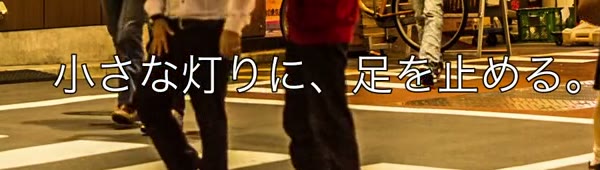

The service exposes no keep-selected-text control. Visible shop signs surviving this sample does not guarantee preservation of signs in another video. The two inspected frames also do not establish animation performance or every frame’s consistency.
Animation needs its own inspection
The separate animation clip in the player uses drawn contours and flat colors. A live-action street result cannot establish how those contours behave after repair.
For an animated source
- Inspect whether a drawn line stays connected through the repaired area.
- Compare a flat-color region for visible patches.
- Play across caption changes instead of judging one still.
- Keep language replacement separate: add new wording in an editor afterward.
Check storage separately from the language
The writing system does not determine whether subtitles are a separate track or part of the video frames.
Disable player subtitles
If the words disappear, remove the selectable subtitle track instead of running image repair.
Inspect any remaining text
Un fichier bilingue ou téléchargé peut contenir plusieurs sources de sous-titres. Vérifiez chaque ligne séparément.
Prepare a supported local clip
Use MP4, MOV or WebM. There is no language selector or translation step in the automatic workflow.
Decide whether your result is ready for the next edit
Check the intended use rather than assuming language support establishes quality.
Before replacing the captions
- The complete line, outline and punctuation are acceptably removed.
- Nearby objects remain usable in motion.
- Important background lettering has been checked against the source.
- The download contains the whole intended scene.
- Replacement subtitles are created separately in your editor.
Try your own video
Choose a local clip, preview it and review the cost before processing.
Free trial & upload limits
Vérifiez votre adresse e-mail pour recevoir 3 crédits d’essai.
Comptes gratuits : 50 Mo · Comptes payants : 100 Mo
1 crédit par seconde entamée · Minimum 3 crédits
La suppression automatique peut aussi modifier d’autres textes ou logos. Voir les tarifs
Questions and answers
Can this remove Japanese subtitles from an animated clip?
It can attempt repair on supported animated video files. Check drawn lines and background continuity; the visual style can make artifacts more noticeable.
Will it replace the subtitles with another language?
No. The workflow removes visible text and does not generate or translate replacement subtitles.
Were these examples processed again for this case study?
No. The notes inspect supplied original/result pairs at fixed timestamps. They do not measure a new job’s speed, cost or performance on other footage.