
Clean up lettering inside an exported Reel, such as a recipe card or a fashion caption. The description beneath the post is a separate platform field.
Reels tutorial cards and fine fashion lettering create different repair problems. Start with a saved file and compare the whole covered area, including objects or fabric underneath it.
Try your own video
Choose a local clip, preview it and review the cost before processing.
Free trial & upload limits
Verifique seu e-mail e receba 3 créditos de teste.
Contas gratuitas: 50 MB · Contas pagas: 100 MB
1 crédito por segundo iniciado · Mínimo de 3 créditos
A remoção automática também pode alterar outros textos ou logotipos. Ver preços
Vídeo original e resultado
Compare the original and result as the video plays.
Tutorial cards cover more than letters
A recipe step on a solid card hides the entire background rectangle. In the coffee example, inspect hands, utensils and the counter under that card. Do not judge the result only by whether the words are gone.
At 1.00s, the coffee tutorial’s opaque instruction card is absent from the supplied result. The brewer’s wooden collar and strap are visible in its place.
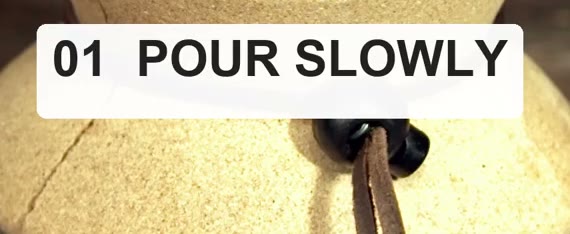
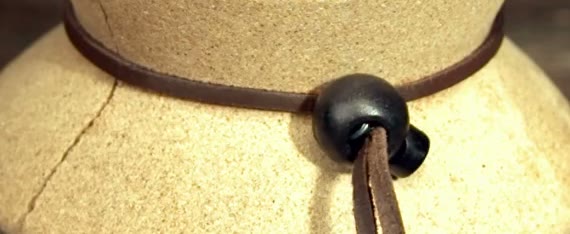
This observation applies to the supplied frame. It does not establish how every hidden object or moving hand would be reconstructed in another tutorial.
Prepare a tutorial card or fashion caption
Keep a distinct source and result so you can compare the exact clip used in your next edit.
Identify the full overlay
A white instruction card hides its complete rectangle, while thin lettering follows a smaller but moving path.
Include the difficult movement
Choose a moment when utensils, hands or clothing cross the text region.
Inspect the downloaded result
Compare the formerly covered objects and check that the vertical composition matches the edit you need.
Rebuild captions as editable objects
Add the next wording in your video editor. Processing here does not update a published Reel or its description.
Fashion lettering crosses moving detail
Thin italic words may lie over fabric or moving limbs. Compare the edge of each stroke and the texture of clothing across several frames, especially at the moment a caption changes.
Use the saved video file
Select MP4, MOV or WebM from your device. There is no Instagram URL input. If you still have the editing project, removing its text object and exporting again may preserve more of the original image.
Prepare your next Reel
Download and inspect the cleaned version before adding new graphics elsewhere. Uploading a video here does not update a published Reel or its description.
Como tirar legendas de vídeos para redes sociaisResolve the remaining mismatch
Check which part of the workflow needs a different action.
Um cartão de texto grande deixa detalhes desconhecidos abaixo.
Likely cause: An opaque card hid the objects that would otherwise be visible there.
What to do: Review the full rectangular area. Use an original clean clip if the hidden hand, prop or texture must be accurate.
The output contains only the opening
Likely cause: The confirmed range may have covered only the beginning of the source.
What to do: Check the task duration. Trim the intended scene before selecting it for a new job and review the cost before confirming.
Questions and answers
Does this edit the description beneath my Reel?
No. Post descriptions are edited through Instagram. This tool repairs visible text in the video file.
Can I remove a text card from an exported tutorial?
Yes, it can attempt to repair a text card. A wide opaque card covers more missing background information, so review the whole covered area carefully.
Can I add a different caption style afterward?
Yes. Import the checked result into your editor and add the new text there. Keep the new captions editable; the removal workflow does not create or translate them.